Thursday, March 15, 2012

Linky Thursday


It’s once again time for Linky Thursday.

Do you ever use snippets from popular movies in your classes? teachwithmovies.org provides lesson plans and discussion guides for a wide variety of movies.

Visual imagery is an important tool of communication. Create graphs and charts easily at hohli.com

Connexions is an open source repository for instructor created modules. Explore the site at:

Merlot is another source for peer reviewed teaching and learning materials, sorted by discipline.

One more repository of learning objects can be found at http://www.wisc-online.com/listobjects.aspx

Monday, March 12, 2012

Finishing Strong - the last 8 weeks

Coming back from a break in the middle of the semester it is sometimes hard to switch gears into school mode again, so much more so for our learners.   Reminding students of your course objectives can help them focus their learning and motivate them to stongly finish the semester.  Having a short discussion with students about what they have learned and what they are expecting to learn can help you focus your instructional time.

A few ideas to help your students jump back into the class and finish the last eight weeks well are:
  1.  If you started your semester with an Syllabus quiz, give the quiz again, or modify it slightly to focus on the last half of the semester. 
  2. Show a PowerPoint slideshow as students enter the room with course objectives and upcoming due dates. 
  3. Take a few minutes at the start of your next class to review objectives. 
  4. Remind students of the successes they have accomplished so far, then discuss your expectations for the rest of the semester.  
  5. Use a discussion forum as a litmus test to gain an understanding of how well students are meeting your objectives by asking broad content questions.  
  6. Have a class discussion asking broad questions about content already covered can help you understand what they have learned.   Questions related to future objectives will help you plan for the last half of your semester. Which may save you class time.
  7. Create a concept web of content covered so far.

Wednesday, February 29, 2012

Internet Explorer Nine.

Microsoft's latest update of their web browser, Internet Explorer 9,  has many new useful features.  Two of these include pinning websites to the task bar to quickly launch websites you use regularly or searching from the address bar. 

One new difference is that the favorites bar is not automatically turned on.  To learn how to turn it on, and learn about other new features of IE9, explore this page from Microsoft.  The video on this site will demonstrate within the first 30 seconds how to turn on the favorites bar.   

http://windows.microsoft.com/en-US/windows7/Getting-started-with-Internet-Explorer-9

Turn on your favorites Toolbar, or access your favorites.
Click this image to see it full size. 


Tuesday, February 28, 2012

Moodle Monday - HTML block

Need to Create a custom block of content in Moodle?   The HTML block will let you post any content in the block and a custom title. There are many instructional possibilities for this tool.  They include:
  • posting weekly objectives to focus students on what they are expected to be learning that week
  • open ended, higher level thinking questions about your content
  • pre-lecture questions, help students focus on what you will be lecturing on in class that week
  • related content from resources other than the textbook such as news articles, journals, youtube videos, or podcasts
  • examples of work pulled from your students.   For example, in an English class you could post the best written sentence of the week.
  • Test questions - prepare your students for an upcoming quiz or test by posting a question of the  day. 

Begin by adding the HTML block.
1.  turn on editing
2.  choose the HTML block
3.  it should now appear at the bottom of the right column.


Next click the edit button on the HTML block. In the new screen
1.  add a title
2.  add your content
3.  click save


The block has been created.  Move the block to any position you want to in the left or right column.  Here the block is placed at the top and right column.

Thursday, February 23, 2012

It's Linky Thursday with a Literary Twist


Do you like to listen to great literature in your car or while you clean house? This week’s Linky Thursday is all about classic literature. Even better, all of these sites provide FREE audio files to download and play for your listening pleasure.

If you’d like to listen to Great Expectations by Charles Dickens on your mp3 player or other mobile device, visit this site. This collection includes public domain texts read by volunteers and available as free downloads. There are many other podcasts here as well.

Globe Radio Reperatory provides  classics of world literature such as Don Quixote and Madame Bovary for your listening pleasure.

Check a few more classics off of your bucket list with this site.

This site lists the titles alphabetically by author.


Tuesday, February 21, 2012

Socrative.com

This morning members of the ITC Staff were able to participate in a Webinar training about a tool called socrative.com.

"Socrative is a smart student response system that empowers teachers to engage their classrooms through a series of educational exercises and games via smartphones, laptops, and tablets."

It's a very simply polling/quizzing tool that is free to use. Instructors create rooms for students to enter using a room number.   Once students are in the room an instructor can push out single questions on the fly, or create quizzes ahead of time to push out to students.   Students are asked to enter their name when taking a quiz.  When the quiz is finished instructors can download quiz results into an excel spreadsheet.  This tool would work well teaching in a computer lab or if know that everyone in your class has a laptop or mobile device.

If you would like assistance learning this tool or you would like to watch the webinar,  please contact the it department at it@svcc.edu.


Click on the link "Printable How to Materials" on this page for a quick training.


Here are a few screen shots taken while exploring this site.

Choices a teacher has in polling or quizzing.


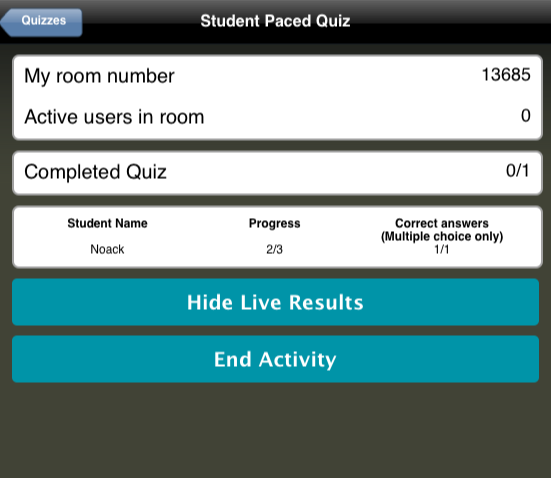
The results screen after students have taken a quiz. 

 A screen shot of a student view taking a quiz on an iPhone.


Monday, February 20, 2012

Kick it up a Notch - Discussion Boards

Whether you are new to online teaching or a veteran, you know that discussion boards can be the life-blood of a course.  It is the online space where classroom discussion can happen, where you find out what your students are thinking, or what they know.   In the last interest survey IT sent out to faculty, learning more about the best practices in forum discussions was a high priority.    Today's Moodle Monday begins to address that need.  The following linked resource from Worcester Polytechnic Institute shares several instructional techniques on the effective use of discussion boards.

Improving the use of Discussion Boards
http://www.wpi.edu/Academics/ATC/Collaboratory/Idea/boards.html

Some to consider:
  • "Weave student comments into your postings as a means of summarizing and subtly assessing"
  • "If the discussion board supplements your in-class activities, be sure to draw a clear connection between the in-class material and the online discussions."
  • "Resist the temptation to make declarative statements."
  • "Provide sample postings representative of each scoring category listed in the rubric."